Groups allow you to organize your voters into different categories. This is particularly useful for associations, federations, or companies with multiple sections, branches, or colleges.
Why Use Voting Groups?
- Organize and segment your voters (by region, category, status, etc.)
- Send targeted messages to specific groups
- Apply different rules or resolutions per group
- Easily filter and analyze results
How to Create and Manage Voting Groups
- Go to your scrutin settings.
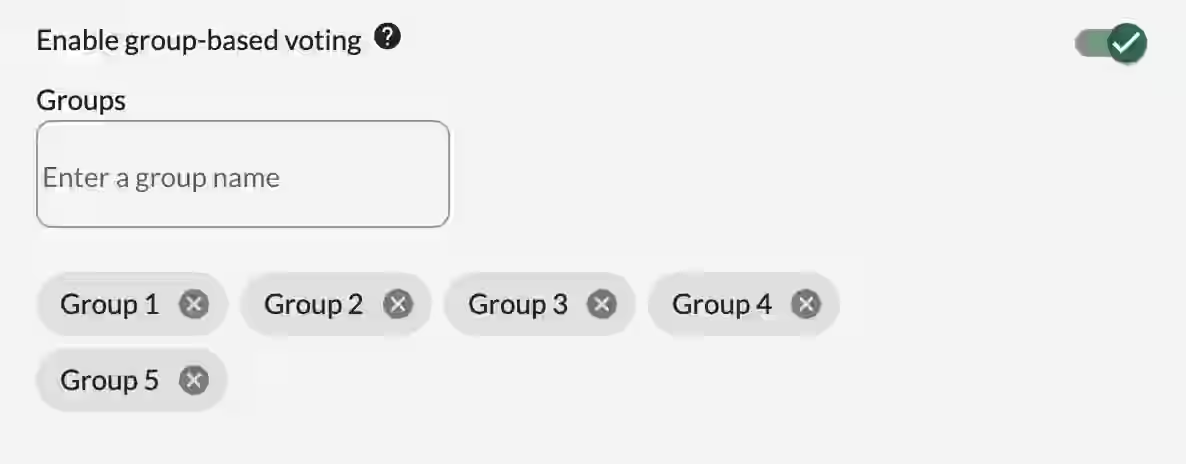
- Enable the Groups feature.
- Create the different groups you need.
Assigning Voters to Groups
When adding a voter manually:
- Select the appropriate group(s) in the voter form.
When importing via CSV (UTF-8):
- Use the group column.
- If a voter belongs to multiple groups, separate them with a slash /.
- If the voter does not belong to any group, leave the field empty.
Enable Group-Based Voting
This feature allows you to associate a voting question with a specific group of voters.
- Once activated, you can restrict access to certain questions so that only members of the selected group(s) can vote on them.
- Warning: Each voter must be assigned to at least one group.
- To restrict voting access, select the appropriate group in the advanced settings of the question.

Sending Messages by Group
Once groups are created, you can send targeted messages:
- Go to Messages
- Select the specific group(s) as the audience
This allows you to communicate only with the relevant voters.
Best Practices
- Clearly define your groups before importing your voter list.
- Use consistent naming.
- Always verify that every voter has been assigned to at least one group.
- Use Group-Based Voting when you need different resolutions or questions for different categories of voters.
Managing groups properly ensures better organization, more relevant communication, and smoother voting processes, especially in complex or multi-level elections.
Related Article
- How to Manage Live or Scheduled Voting
Learn how to configure and manage secret ballot voting settings for maximum confidentiality and compliance.
→ How to Manage Live or Scheduled Voting
Explore More Topics
- How a Digital Ballot Box Works: Online Voting Process & Security
Discover the complete process and security measures behind Voteer’s digital ballot box for secure and transparent online voting.
Support
Need help?
👉 Email: support@voteer.com
👉 Or use the live chat directly in Backstage