Voteer offers flexible and secure authentication options to verify voters’ identity while maintaining a smooth voting experience. The organizer can choose between single, double, or triple authentication levels depending on the required security.
How to Access Authentication Settings
- Go to your ballot
- Click on Configurations in the left menu
- Scroll down to the Authentication section
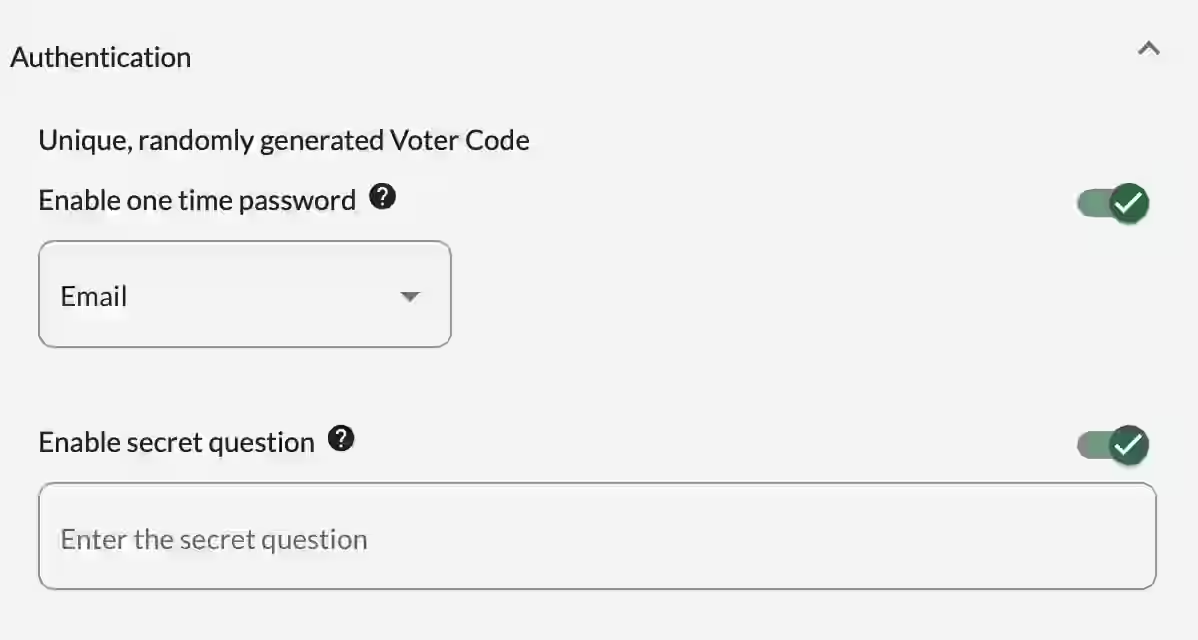
Authentication Methods
1. Voter Code (Identifier)
This is the minimum required authentication.
- Each voter receives a unique random code generated by the platform (Voter Code).
- Voters must enter this code to access the scrutiny.
- This method is always active.
2. One-Time Password (OTP) – Single Use Password
- Enabled: The organizer can choose to send a one-time password by SMS or Email.
- Disabled: No OTP is required.
This adds a strong second layer of security, especially recommended for important votes.
3. Secret Question
- Enabled: The organizer defines a secret question. Each voter must provide the correct answer.
- Disabled: No secret question is asked.
Important: For the secret question to work, the answer for each voter must be pre-imported into the platform.
Tip: We recommend asking questions with numerical answers (ex: year of birth, postal code, number of children, etc.) to avoid typing errors and make the authentication process smoother.
Authentication Levels
Voteer allows you to combine these methods:
- Single Authentication: Voter Code only
- Double Authentication: Voter Code + OTP or Voter Code + Secret Question
- Triple Authentication: Voter Code + OTP + Secret Question
Related Article
- How to Vote with Voteer
Learn how to cast your vote step by step on the Voteer platform.
Explore More Topics
- How Sealing Ensures Transparency and Integrity in Secure Online Voting
Discover how the sealing process protects the integrity and transparency of your electronic votes.
Support
Need help?
👉 Email: support@voteer.com
👉 Or use the live chat directly in Backstage