Once your organization and team are set up, you can start working on your scrutin in three different ways.
1. Create a Scrutin from Scratch
This is the best option when you are starting a completely new vote.
- Go to your organization dashboard.
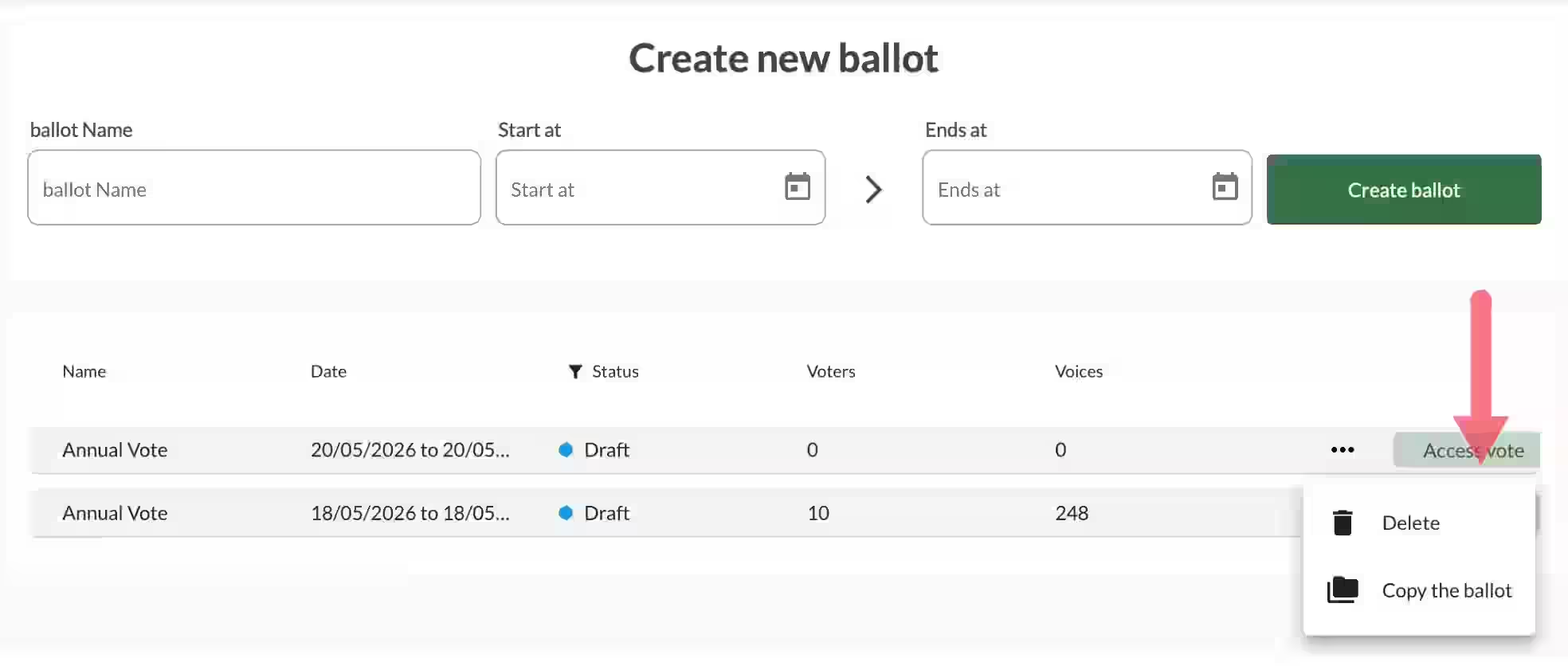
- Click Create a new scrutin.
- Give it a name and configure the main settings (voting period, security level, etc.).
- The scrutin is automatically saved as Draft.
You can then proceed with the full configuration (voter list, questions, communications, etc.).
2. Duplicate an Existing Scrutin
Duplicating is the fastest way to create a new scrutin, especially useful for recurring votes or multiple rounds.
When duplicating, you can choose what to copy:
- All configurations and settings
- The voter list
- The same voter codes (very useful for two-round elections)
- Previous votes (optional)
To duplicate:
- Go to your list of scrutins.
- Click the three dots (…) next to the scrutin you want to duplicate.
- Select Duplicate.
- Choose the elements you want to keep.
- Rename the new scrutin and make any necessary adjustments.
Best practice: To save valuable time, especially for multi-round elections or recurring votes, duplicating a previous scrutin is highly recommended. It allows you to maintain consistent settings and voter codes.
3. Join an Existing Scrutin
If another organizer has invited you to collaborate on a scrutin:
- You will receive an invitation by email.
- Click the link in the email or go to Settings > Team to accept the invitation.
- Once accepted, the scrutin will appear in your dashboard.

Important Notes
- Duplicating allows you to maintain consistency across multiple rounds while still being able to make adjustments.
- Only Organizers can create or duplicate scrutins.
- Each scrutin is completely independent, even if duplicated.
This flexibility allows you to work efficiently whether you are starting fresh, repeating a previous vote, or collaborating on someone else’s scrutin.
Related Article
- Quick Start: Configure and Run a Ballot in Voteer
Learn how to quickly configure and launch your first scrutin with Voteer in just a few steps.
→ Quick Start: Configure and Run a Ballot in Voteer
Explore More Topics
- Transform Your Ballots with Voteer: The Secure Electronic Voting Solution
Discover how Voteer transforms traditional ballots into a secure, modern, and efficient electronic voting experience.
Support
Need help?
👉 Email: support@voteer.com
👉 Or use the live chat directly in Backstage